
Usenet vs Torrents comparison
Usenet vs Torrent: Which Is Better for Speed, Privacy and Reliability?
Usenet and torrents are often mentioned together, but they work in very different ways. Torrenting is based on peer-to-peer swarms, while Usenet is based on server access through a Usenet provider. This difference changes everything: speed, privacy exposure, reliability, automation and the overall user experience.
Why Modern Usenet Changed the Comparison ?:
Old Usenet and modern Usenet are not the same experience. Today, many Usenet posts are obfuscated, discovered through NZB indexers, retrieved through SSL-secured connections and managed through downloaders or web interfaces.
This is why the Usenet vs Torrent comparison has changed. Modern Usenet is not just another download method. It is a more structured, server-based and automation-friendly ecosystem.
How Torrenting Works
Torrenting is based on a peer-to-peer model. Instead of downloading from a central server, your torrent client connects to other users who already have pieces of the file. These users are part of a swarm.
This model can work very well when there are many fast seeders. But it also means speed and availability depend on other users. If the swarm is weak, slow or inactive, downloads can become slow or incomplete.
How Usenet Works
Usenet uses a server-based model. You subscribe to a Usenet provider, configure NNTP access or use a web interface, and download article parts from the provider’s servers. You are not joining a public peer-to-peer swarm.
Modern Usenet usually relies on NZB files, indexers, downloaders such as NZBGet or SABnzbd, and providers with strong completion and retention. Some services, such as Easynews, simplify the process by combining web-based Usenet search, previews, browser access and traditional NNTP support.
This modern workflow is part of what we call Stealth Usenet: obfuscated posts, NZB files, indexers, SSL-secured access and smarter provider setups.
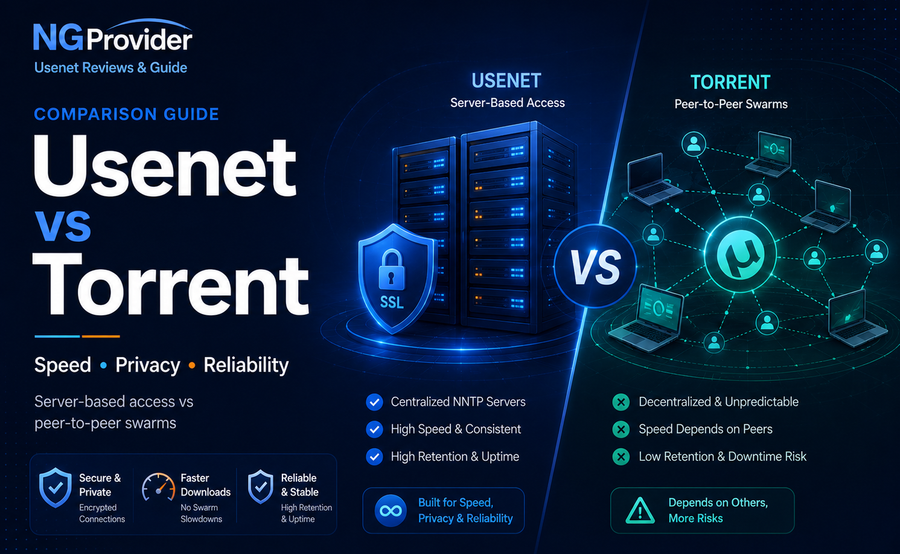
Usenet vs Torrent: Quick Comparison
The simplest way to understand the difference is this: torrents depend on other users, while Usenet depends on servers. With torrents, you join a peer-to-peer swarm. With Usenet, you connect to a provider and download article parts from NNTP servers.
| Criteria | Usenet | Torrent |
|---|---|---|
| Network model | Server-based NNTP access | Peer-to-peer swarm |
| Speed | Very fast and consistent (often saturates your full bandwidth) | Depends heavily on seeders and swarm health |
| Upload / Sharing | You only download | Required while seeding (increases legal risk) |
| Privacy / Security | Excellent – your IP is hidden from other users (SSL/TLS + provider) | Poor without VPN (IP visible to all peers and copyright monitors) |
| Cost | Paid (~$8 for good provider + indexer) e.g. Newshosting Deal $5.99/mo + NZBfinder $1.25/mo View All Usenet Providers |
Free (optional VPN) e.g. PrivadoVPN $1.11/mo |
| Retention / Availability | Excellent (many providers keep files 5,000–6,400+ days) | Poor for older content (dies when seeders disappear) |
| Content Discovery | Requires good NZB indexers (some free, many paid)) | Easy via public trackers, search engines and private trackers |
| Ease of use | Moderate learning curve (requires provider + indexer + downloader) | Simple client setup, but inconsistent results |
| Automation | Excellent (SABnzbd + Sonarr/Radarr/Lidarr etc. work perfectly) | Good (qBittorrent + *arr apps), but less reliables |
| Best for | Choose Usenet if you want maximum speed, reliability, privacy, and automation. Ideal for serious media collectors and homelab users running Plex/Jellyfin. | Choose Torrents if you want zero or very low cost, don’t mind using a VPN, and mostly download new/popular content. |
Network Model: Usenet Servers vs Torrent Swarms
The most important difference between Usenet and torrents is the network model. Usenet is based on server access: you connect to a Usenet provider and download article parts from NNTP servers. Torrenting is based on peer-to-peer swarms: your client connects to other users who are sharing pieces of the same file.
This changes the entire experience. With Usenet, performance depends mainly on your provider, your plan, the number of connections allowed and your own internet connection. With torrents, performance depends on the health of the swarm, the number of seeders, the speed of those seeders and whether peers stay online.
This server-based model is one of the reasons Usenet can feel more stable and more discreet than torrents. You are not joining a public swarm of peers. Instead, your newsreader or web interface communicates with your Usenet provider.
Speed: Usenet Is Usually More Consistent
Usenet is often more consistent than torrenting because you are downloading from dedicated servers instead of relying on random peers. With a good Usenet provider, the main limits are usually your internet connection, provider speed, number of connections and server performance.
Torrent speed can be excellent when a swarm is healthy, but it can also collapse when there are not enough seeders. For older or less popular content, this dependency can be frustrating.
Upload and Sharing: Usenet Downloads, Torrents Share
One of the most important differences between Usenet and torrents is upload behavior. With Usenet, you download from your provider’s servers. You are not required to share pieces of the file with other users.
With torrents, seeding is part of the peer-to-peer model. This helps the swarm survive, but it also means your client can share data with other peers. For privacy and legal exposure, this is a major difference.
Privacy: Server-Based Access vs Peer-to-Peer Swarms
Privacy is one of the biggest differences between Usenet and torrents.
In a torrent swarm, your client communicates with other peers, and your IP address can be visible to participants in that swarm. With torrents, a VPN is essential because of the public peer-to-peer swarm model.
With Usenet, the connection is between you and your Usenet provider. If SSL is enabled, the NNTP connection is encrypted between your device and the provider’s servers. This makes Usenet less exposed than public torrent swarms.
However, this does not mean Usenet is automatically anonymous. Your provider, account email, payment method, IP address, SSL settings and personal habits still matter. Some users also prefer providers that accept Bitcoin and crypto payments for additional payment discretion.
Cost: Usenet Is Paid, Torrents Are Usually Free
Torrenting is usually free, although many users add a VPN for privacy. Usenet usually requires a paid provider and, for advanced workflows, one or more NZB indexers.
The cost difference is real, but Usenet users pay for speed, retention, completion, SSL-secured server access and better automation possibilities.
Reliability: Retention and Completion vs Seeders
Torrent reliability depends on seeders. If nobody is seeding, the file may be unavailable. If there are only a few slow seeders, the download may take a long time or never complete.
Usenet reliability depends on different criteria: retention, completion, provider quality and sometimes backup block accounts. A premium provider can keep articles available for a long time and deliver more consistent results.
Advanced users can also combine a primary unlimited provider with a backup block account. This can improve completion without paying for two full unlimited subscriptions. See our guide to best Usenet provider combinations.
Content Discovery: NZB Indexers vs Torrent Trackers
Torrent users usually discover files through public trackers, private trackers, torrent search engines or magnet links. Usenet users rely more on NZB indexers, web interfaces and automation tools.
A good NZB indexer is especially important with modern obfuscated Usenet posts. This is why indexer quality and API access matter so much in a serious Usenet setup.
Ease of Use: Torrent Clients vs Easynews and NZB Tools
Torrenting is easy to understand at first: install a torrent client, open a torrent file or magnet link, and join the swarm. This simplicity is one reason torrents became so popular.
Usenet can feel more technical because it may require a provider, NZB indexer and downloader. But this is not always the case.
Automation: Usenet Has a Stronger Advanced Workflow
Usenet has a strong automation ecosystem. Tools such as NZBGet, SABnzbd, Prowlarr, Sonarr, Radarr and Lidarr can connect NZB indexers, API keys, downloaders and media management workflows.
This is one of the reasons advanced users often prefer Usenet. Once configured correctly, a Usenet automation setup can search indexers, retrieve NZB files, send them to a downloader and organize the result with much less manual work.
We cover the full workflow in our Usenet Automation guide.
Best Usenet Providers if You Are Moving from Torrents
If you are used to torrents and want to try Usenet, the best provider depends on whether you want simplicity, the best all-round package or a strong European-focused account.
| Provider | Why It Fits Former Torrent Users | Review |
|---|---|---|
| Newshosting | Best overall package with strong NNTP access, high completion, newsreader and VPN included. | Newshosting Review |
| Eweka | Excellent European-focused Usenet provider with strong completion and reliable access. | Eweka Review |
| Easynews | Web-based search, previews and browser access make Easynews the easiest Usenet entry point. | Easynews Review |
You can compare more options in our Best Usenet Providers ranking.
Choose torrents if you want a simple peer-to-peer system and accept swarm dependency. Choose Usenet if you want server-based access, more consistent speed, SSL-secured connections, stronger automation and a modern Stealth Usenet workflow built around NZB files, indexers and reliable providers.
Usenet vs Torrent FAQ
Is Usenet faster than torrenting?
Usenet is often more consistent than torrenting because it downloads from Usenet servers instead of relying on seeders in a peer-to-peer swarm. Actual speed still depends on your provider, plan, connections and internet connection.
Is Usenet more private than torrents?
Usenet is generally less exposed than public torrent swarms because you connect to NNTP servers instead of sharing within a peer-to-peer swarm. However, Usenet does not create automatic anonymity.
Do you need a VPN with Usenet?
A VPN can add another privacy layer, but SSL-secured NNTP access is the essential protection for the connection between your device and the Usenet provider. Some Usenet plans include VPN access.
Why do torrents depend on seeders?
Torrenting is peer-to-peer. Files are shared by users in a swarm. If there are not enough seeders or if seeders are slow, downloads can be slow or incomplete.
Is Easynews easier than a full Usenet setup?
Yes. Easynews can be easier because it combines web-based Usenet search, browser access, file previews and traditional NNTP support in one account.
What is Stealth Usenet?
Stealth Usenet describes the modern Usenet workflow built around obfuscated posts, NZB files, indexers, SSL-secured access, smart providers and optional crypto payments.